PIM Console · In-depth case
Turning missing product data into a work queue
Based on my experience on Lidia PIM, a concept project where I redesigned how catalog teams get products ready for sales channels.
Lidia's real screens are confidential. Screens on this page are representative work, redrawn with sample data based on my experience on these products.
Problem
Catalog teams open products one by one to find missing data. Why a product can't go live on a given channel is often invisible.
Solution
A work queue that groups missing data by field rather than by product, and bulk editing that fills the same field across many products at once.
Intended impact
Remove the need to open products to find gaps, prevent channel rejections before submission, reduce repetitive entry to a single action.
Users
Three roles using the same screen for three purposes.
Catalog editor
Enters and enriches product data.
Biggest pain
Has to open products one by one to find gaps.
Category manager
Defines categories and attribute sets.
Biggest pain
Has no summary of the category's overall state.
Marketplace specialist
Pushes products to marketplace channels.
Biggest pain
Errors only surface after submission, on the channel side.
Research
I understood the work before designing the screen.
Sources: my experience on console projects · review of common PIM products · marketplace listing rules
- 01
Hypothesis
Missing data is thought of by field, not by product.
How to validate
Task-based interviews with 5 catalog editors, observing where they start.
- 02
Hypothesis
Nobody keeps channel requirements in their head.
How to validate
Group the last 3 months of channel rejections by field.
- 03
Hypothesis
The same value is typed into dozens of products one by one.
How to validate
Measure how often the same value repeats in import logs.
Current flow
How does a product go live today?
- 01
Import data
Supplier file is uploaded via Excel.
- 02
Find gaps
Products are opened one by one to look for empty fields.
- 03
Edit data
The same value is entered separately for each product.
- 04
Send to channel
Products are sent to the marketplace in bulk.
- 05
Fix errors
Rejected products are found one by one in the channel panel.
Most time is lost in step 2, and errors surface only after the work is done. Effort scores are an estimate based on my experience.
Problem and goals
How might we…
- 01
…let catalog editors see missing data without opening products?
- 02
…make channel requirements visible before submission?
- 03
…enter the same value into many products at once?
- Time to publish↓
- Missing data rate↓
- Channel rejection rate↓
- Bulk edit adoption↑
Constraints: existing data model stays · 3 sales channels · a first release that fits one development cycle
New flow
Let the system, not the user, find the gaps.
Import
Supplier file is uploaded
- New
Automatic validation
Each product is checked against channel rules
- New
Missing data queue
Gaps are grouped by field
- New
Bulk edit
One field, applied to selected products at once
Send to channel
Only ready products; on error the product returns to the queue
Alternatives
I compared three approaches in low fidelity.
A
Warnings on the product page
+ Easy to add to the current flow
− Still requires opening products to find gaps
B
Inline editing in the table
+ Fast, familiar pattern
− Hundreds of fields don't fit one table
C Chosen
Field-based work queue
+ Matches how users think
− Needs a new screen and some learning
Why C: in research, users thought about gaps by field, not by product.
Final design
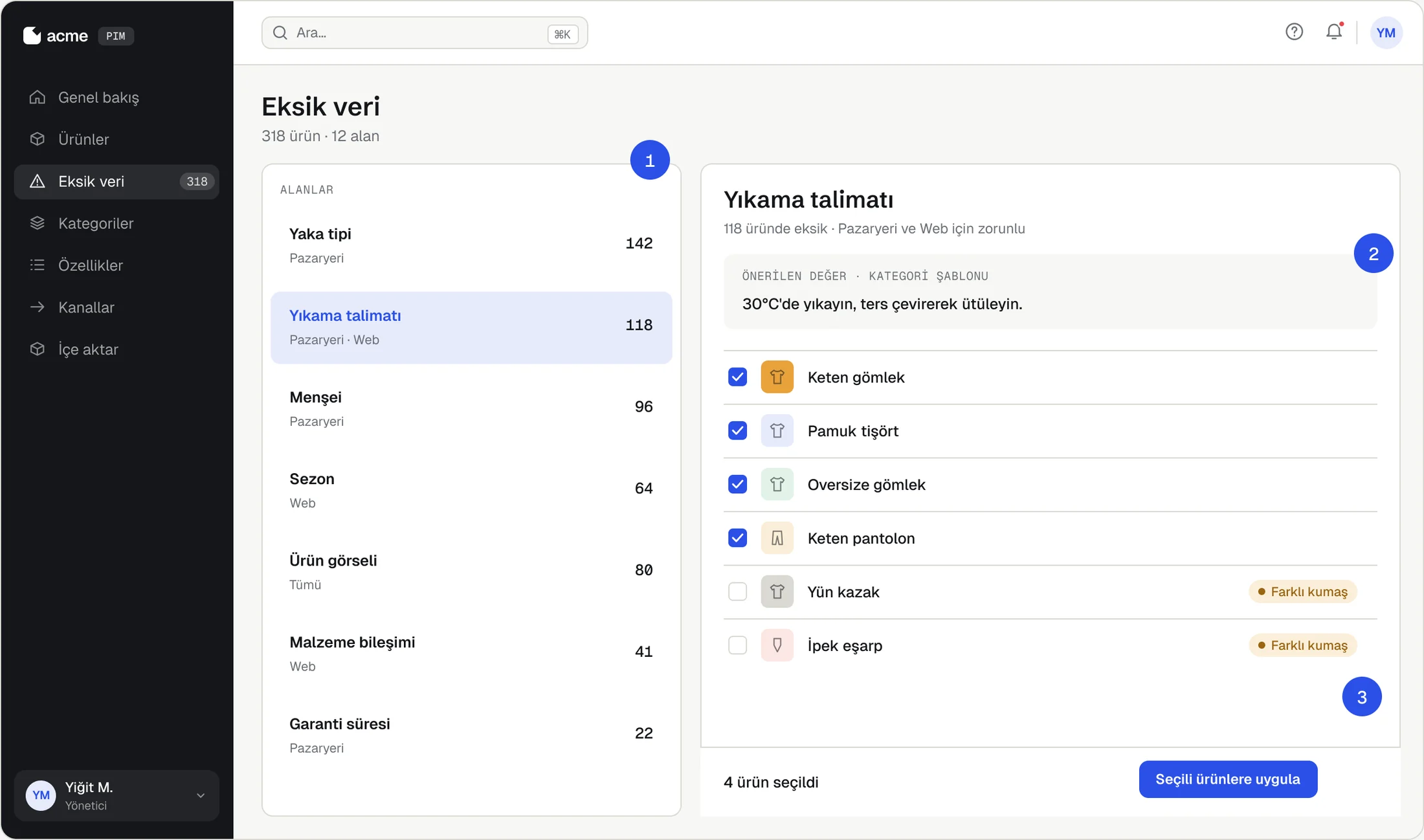
Missing data queue: a work list grouped by field
- 1
Fields, not products
The key research finding: editors start from missing fields.
- 2
Suggestions from the category template
The most common value in the category is suggested for empty fields.
- 3
Outliers are flagged
Products that don't fit the suggestion aren't auto-selected, preventing a bad bulk action.
Final design
Bulk edit: show what will change before applying
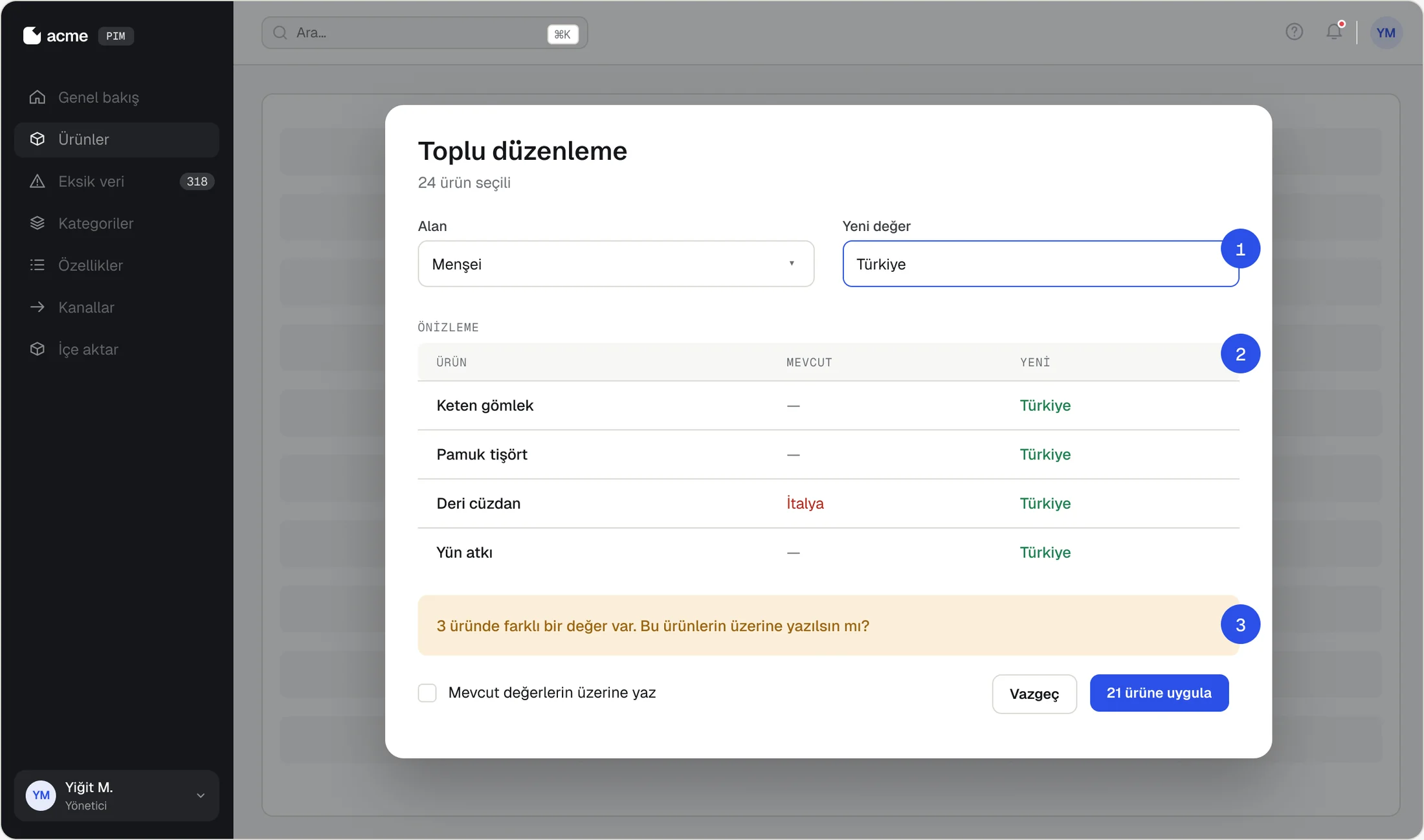
- 1
One field, one value
The modal does one job: two inputs instead of a complex form.
- 2
Preview first
Users see every row that will change before applying.
- 3
Safe default
Existing values are kept by default; the button states how many products are affected.
Testing and iteration
Test plan and design review
| Task | Success criterion |
|---|---|
| 01 Find missing fields for the marketplace | < 30 s |
| 02 Bulk-fill one field for 20 products | One action |
| 03 Undo a wrong bulk action | < 10 s |
| 04 Get one product channel-ready | Error-free |
Finding (design review): the first version had no undo for bulk actions; one mistake could affect hundreds of products.
Change: added a preview step before applying and a toast with “Undo” afterwards.
Outcomes
Intended impact and what I learned
Seconds
to find gaps, without opening products
Before submission
when channel errors are caught
One action
to enter one value into many products
Find the user's mental model.
Building the screen around fields instead of products was the decision that simplified the flow most.
In bulk actions, trust comes before speed.
Preview and undo make a risky bulk action safe.
Make the rules visible.
Bringing channel requirements into the UI aims to catch errors at the source.
Next steps: test with real users · automatic image quality checks · the same queue for the supplier portal
From the same system
Product editing and channel readiness
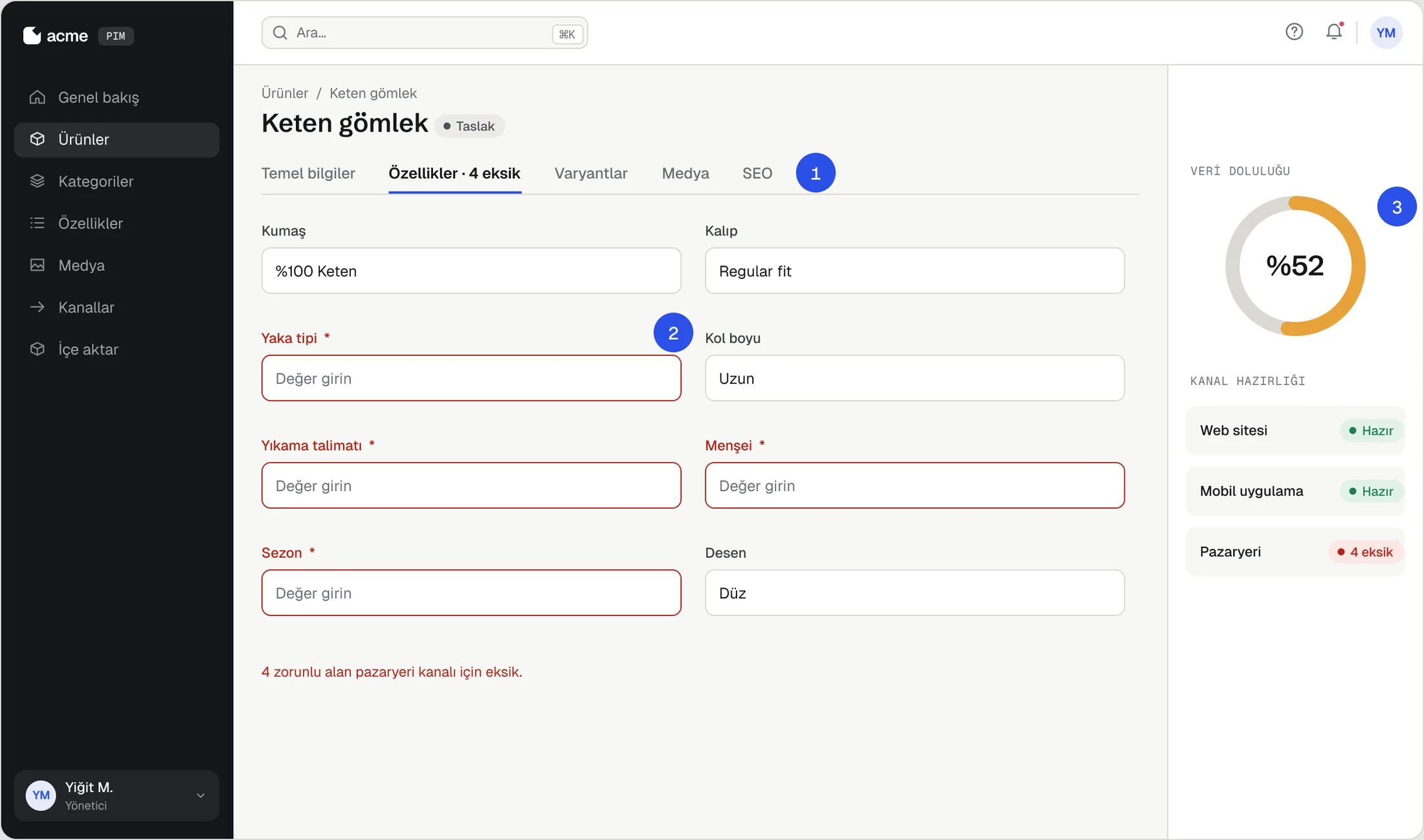
- 1
Gaps are counted on tabs
Users see which tab needs work without opening it.
- 2
Required fields per channel
A field is marked required only for the channel that needs it.
- 3
Readiness at a glance
Completeness score and channel status show what's missing before publishing.